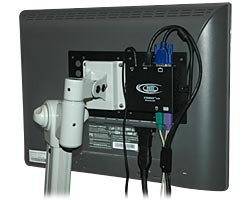
A Vesa monitor mount is an option for hanging a monitor on a wall or on a swivel arm. These bracket mounts are configured with two standard hole patterns. On them, you will find a set of four screw holes with a horizontal and vertical measurement of 75 millimeters, or about 3 inches apart. A second set of holes for four screws measures 100 millimeters or about 4 inches apart.
HP LP2065 20-inch LCD Monitor
Hewlett-Packard's LP2065 20-inch LCD monitor has a removable stand and 100 millimeter holes for mounting. The video input supports digital signal inputs and DVI analog. This monitor includes two DVI-I to VGA and two DVI-Digital cables. It has a 2.0 USB hub that has one output to connect to the computer and four inputs for USB device connection. The viewing angle is 178/178 degrees. The video inputs are digital DVI-I, S-Video, analog RGB and composite video.
NEC MultiSync E222W 22-inch Wide-screen LCD Monitor
This monitor has ergonomic features making it flexible for daily use. The NEC MultiSync has Vesa mounts and a hand grip on the rear. This monitor features a 22-inch LCD display measuring 20 inches by 8.4 inches by 15.2 inches. It weighs 15 pounds. It also has a swivel that may be adjusted for tilt and height. It has an image aspect ratio of 16:10. The image brightness is 300 cd/m2 and an image contrast ratio of 1,000:1. The signal output is VGA and DVI-D and the monitor is certified for use with Windows Vista.
EIZO ColorEdge CG223W-BK 22-inch Wide-screen LCD Monitor
The Eizo ColorEdge has a FlexStand that will allow you to swivel, tilt and rotate the monitor by 90 degrees to provide a portrait view. You also can mount the monitor onto a Vesa bracket. This monitor features a USB hub. Its dimensions are 20.1 inches by 10.1 inches by 20.6 inches. It weighs 21.2 pounds. Its aspect ratio is 16:10 and it has an image contrast ratio of 950:1. The signal input is DVI-I, and it comes with Display-Port.

 One of the most important components in a custom build is the graphics card. If you're building a CustoMac, it's an especially tricky decision. Not only do you have to worry about what will be a good performer for the cost, but you also have to be informed what is fully supported, and what is not.


